Hey everyone, gather around I want to share a personal story that’s honestly changed my life this year. It’s December 2025, and just a few months ago, I was that guy who picked up his phone every five minutes. I would unlock it to check the time, and boom 45 minutes gone, scrolling through endless feeds, feeling drained and guilty. minimalist Android launcher Doom-scrolling had me in its grip, and no matter how many times I promised myself “just one more video,” I couldn’t stop. My screen time was embarrassing sometimes over 6 hours a day.
Then, I stumbled upon something that felt like a lifeline: Escape Launcher, a super simple, minimalist Android launcher that’s completely free and designed to help you escape phone addiction. I downloaded it from GitHub (it’s open-source, made by a developer named George Clensy), and guys… it was like breathing fresh air for the first time. My phone went from a chaotic mess of colorful icons and notifications to a calm, plain list of apps. No more shiny distractions pulling me in. Suddenly, using my phone felt intentional I only opened what I really needed.
If you are tired of feeling controlled by your phone and want a cleaner setup, stick with me. I’ll walk you through my experience, show some real examples, and answer those common questions I had when I started.
What Happened When I Switched – My Before and After Story
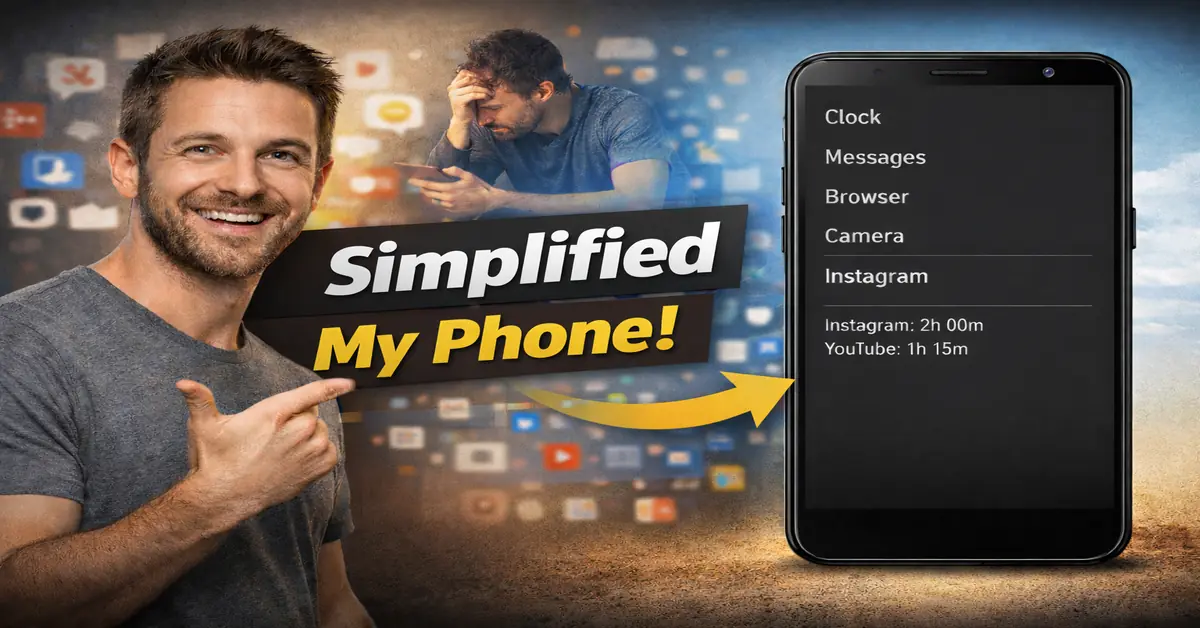
Before Escape, my home screen was a disaster: pages full of apps, widgets blinking with news and social updates, folders everywhere. It was overwhelming. The “after”? Pure peace. Just a simple text list of my apps, maybe a clock at the top, and nothing else screaming for attention.
Seeing that change hit me hard. My daily screen time dropped by almost half in the first week! And the best part? Escape shows how much time you have spent on each app right there on the list. Opening Instagram and seeing “2 hours today” staring back? It makes you pause and think twice. That’s how it helped me escape doom-scrolling forever – by making bad habits visible.
Best Minimalist Android Launcher: Why I Think Escape Wins in 2025
I have tried a bunch Niagara, OLauncher, Before Launcher and while they are all great, Escape feels like the best minimalist Android launcher for anyone fighting addiction. It’s barebones but smart: hide distracting apps easily, track usage without extra tools, and it even works with Android 15’s new Private Space. Plus, it’s updated regularly latest buzz from December 2025 highlights its anti-doom scrolling focus.
Minimalist Android Launcher Free: No Catches, Just Good Stuff
The best part? Escape is a true minimalist Android launcher free – no ads, no hidden payments, nothing. You just download the APK from GitHub and install it. Same with others like OLauncher, which is also free and open-source.

Minimalist Android Launcher Samsung: Perfect on My Galaxy
I have a Samsung phone, and I worried if a minimalist Android launcher Samsung would play nice with One UI. Turns out, yes! Escape runs smooth as butter – no lags, better battery even, and it doesn’t mess with Samsung features I still want.
Minimalist Android Launcher Open Source: Why Trust Matters
Being a minimalist Android launcher open source means anyone can check the code no sneaky tracking. Escape, OLauncher, and KISS are all like that. It gives me peace of mind in 2025 when privacy feels more important than ever.
Free Apps Like Minimalist Phone for Android
Minimalist Phone is cool with its grayscale and blockers, but it has paid upgrades. If you want free apps like Minimalist Phone for Android, try Escape it hides apps, shows screen time, and keeps things simple without costing a dime. Before Launcher is another good free one.
Minimalist Phone Launcher: The Simple Features I Love Daily
As my go-to minimalist phone launcher, Escape keeps it easy searchable app list, hide what tempts you, calm colors that match your phone’s theme. No overload just what you need for a distraction-free day.
Indistract Minimalist Launcher Add: Another One I Tried
I also tested Indistract Minimalist Launcher. It’s nice with weather bits and quick shortcuts, inspired by staying focused. Free basic version, but Escape won me over with its pure openness and addiction tools.
How to Start Your Own Minimalist Home Screen Revolution
Super easy: Search “GeorgeClensy Escape Launcher” on GitHub, grab the latest APK, install allow unknown sources, and set it as default. Tweak a few settings, hide social apps first – and watch the magic.
Friends, if you are nodding along thinking “that’s me,” give Escape a try. It’s not fancy, but it’s real. My phone feels like a tool again, not a trap. Less stress, more time for real life. Who’s with me in making 2025 the year we take back control?
Also Read: Gemini 3 Pro Is Changing How Smart Your Phone Feels in 2025
Also Read: Red Dead Redemption Mobile (2025) – Full Game Free on Netflix | Rockstar