Let’s be honest your Android phone’s default file manager is fine. Just like a bicycle is fine when you need to cross a city in 20 minutes.
If you actually want control over your files, your storage, your cloud, and your network you need a proper file manager app. And in 2026, there are some genuinely great options available.
We tested and ranked the 8 best file manager apps for Android based on real features, honest limitations, pricing, and who each app is actually built for.
What Makes a Good Android File Manager?
Before jumping into the list, here is what separates a great file manager from a forgettable one:
- Clean navigation that does not make you feel like you need a PhD
- Support for network protocols like FTP, SFTP, SMB, and WebDAV
- Cloud storage integration (Google Drive, Dropbox, OneDrive, etc.)
- Archive support ZIP, RAR, 7z at minimum
- Root access for advanced users
- Privacy no trackers, no unnecessary data collection
- Honest, fair pricing
With that in mind, let’s get into it.
1. Solid Explorer — Best Overall File Manager for Android
Price: Free 14-day trial, then ~$2.99 one-time purchase Developer: NeatBytes Download: Google Play
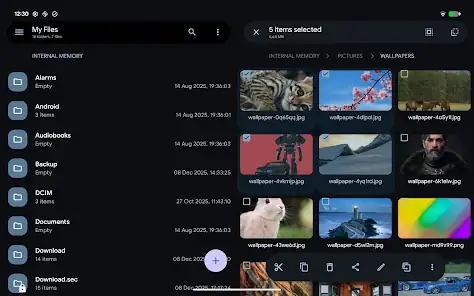
Solid Explorer is the gold standard for Android file management. It has been around for years and still gets regular updates, with the latest version dropping in May 2026.
The headline feature is its dual-pane interface you can view two folders side by side and drag-and-drop files between them. It sounds simple, but once you use it, going back feels painful.
Key Strengths:
- Dual-pane file management with drag-and-drop
- Real-time folder size display (updates live as files change)
- Fingerprint lock for sensitive folders more reliable than Android’s Private Space
- Strong cloud support: Google Drive, Dropbox, OneDrive, Box
- Network protocols: FTP, SFTP, SMB, WebDAV, NFS
- File encryption vault for securing private files
- Beautiful Material You design that actually looks modern
- Rated 4.4 stars across 142,000+ reviews on Google Play
Honest Limitations:
- It costs money about $2.99 after the trial
- Phone and tablet only no Android TV or Wear OS support
- Some users report the license check occasionally fails after updates, which is frustrating when you have already paid
Who is it for? Anyone who wants a polished, powerful, all-in-one file manager and does not mind paying a small one-time fee. It is the best Android file manager for most people.
2. MiXplorer — Best File Manager for Advanced Users
Price: Free via XDA Labs, or $4.99 (MiXplorer Silver on Google Play) Developer: HootDev (XDA) Download: Google Play – MiXplorer Silver
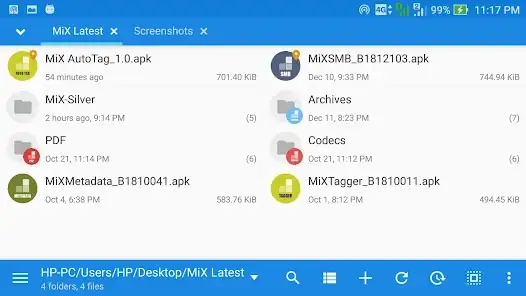
If Solid Explorer is a sharp kitchen knife, MiXplorer is an entire workshop. It is modular, customizable to an almost unreasonable degree, and has been in active development for over a decade.
The plugin system is the real story here. You can add NFS support, hash checkers, additional media players, cloud storage connectors, and custom skins all from third-party developers. Android Authority’s reviewer called it his personal favorite file manager and highlighted its dropdown breadcrumbs menu as a particularly clever design choice for navigating deep folder hierarchies without wasting screen space.
Key Strengths:
- Dual-pane layout with tab navigation
- Massive plugin ecosystem extend almost any functionality
- Excellent archive support: ZIP, RAR, 7z, TAR, ISO
- Network protocols: FTP, SFTP, SMB, WebDAV, NFS
- Highly customizable themes and layout options
- Root access included
- Free version available (from XDA Labs, no Play Store required)
Honest Limitations:
- The free version requires sideloading from XDA not ideal for everyone
- The plugin setup adds real complexity for casual users
- No Android TV, Wear OS, or VR support
- Cloud storage requires plugins, not built natively
- The interface can feel overwhelming if you just want to find a file quickly
Who is it for? Power users, developers, and tinkerers who want maximum control and do not mind spending an afternoon setting things up properly. Worth every minute.
3. Files by Google — Best Free and Simple Option
Price: Free Developer: Google LLC Download: Google Play
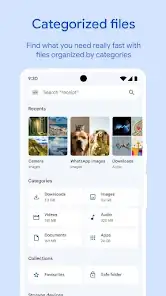
Files by Google launched in December 2017 and has quietly become one of the most-used file managers on Android partly because it comes pre-installed on Pixel devices and many other phones. It is available in 90 languages and gets consistent updates, with the latest build arriving in May 2026.
It will not impress power users. But for someone who just needs to find a downloaded PDF, clean up old photos, or free up storage space, it does exactly what it promises without any friction.
Key Strengths:
- Pre-installed on most Android phones zero setup
- Clean, Google-standard design that anyone can pick up immediately
- Smart storage cleanup suggestions finds large, duplicate, and unused files
- Nearby Share integration for quick file transfers
- Completely free, no ads, no upsells
Honest Limitations:
- No FTP, SMB, SFTP, or WebDAV not even close
- No archive creation (you can only extract ZIP files, not create them)
- No root access
- Cloud support limited to Google Drive only
- No Android TV, Wear OS app, or VR support
Who is it for? Casual users who want something that just works, costs nothing, and does not require any configuration. If your needs are basic, this is genuinely a great choice.
4. Cx File Explorer — Best Free Alternative with Storage Analysis
Price: Free Developer: Cx File Explorer Team Download: Google Play
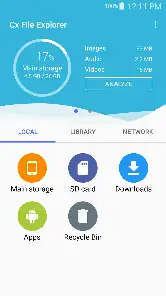
Cx File Explorer punches above its weight for a free app. The standout feature is its storage analysis toolkit it breaks down exactly where your space is going, shows the largest files on your device, and visualizes how much each file type is consuming. If you are running out of storage and want to understand why, this is genuinely useful.
Beyond the analysis tools, it has a clean interface, a compact breadcrumb menu, and built-in image, video, and audio players.
Key Strengths:
- Detailed storage analysis find storage hogs quickly
- Clean, minimal interface that is easy to navigate
- Built-in media players for images, video, and audio
- Free with no ads
- Basic SMB/LAN network browsing
Honest Limitations:

- No root access
- No FTP, SFTP, or WebDAV SMB only for networking
- Archive support limited to ZIP only
- No Wear OS, TV, or VR support
- Cloud support is very limited (Google Drive only)
Who is it for? Users who want a free, clean file manager with genuinely useful storage analysis tools. Great for clearing up space on a cluttered device.
5. Total Commander — Best for Network Storage and Power Workflows
Price: Completely free Developer: Christian Ghisler Download: Google Play
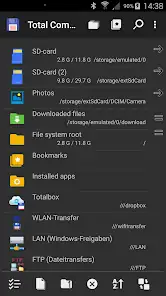
Total Commander has been around since the Windows 95 era yes, really and the Android version carries that same spirit of extreme functionality. It is free, dual-pane, and can handle almost any file operation you throw at it once you have it configured.
The catch is that word: configured. Total Commander relies on plugins for most of its advanced features, including FTP, SFTP, SMB, and cloud storage. Installing and setting those up takes time and some patience.
Key Strengths:
- Completely free no trial, no IAP, no subscription
- Dual-pane interface familiar to Windows Total Commander users
- Rich plugin system for FTP, SFTP, SMB, and cloud services
- Root access supported
- Handles a huge range of archive formats: ZIP, RAR, 7z, TAR
Honest Limitations:
- Requires manual plugin installation for most features not plug-and-play
- The interface feels dated compared to modern Material Design apps
- No Android TV, Wear OS, or VR support
- Development cadence is slower than newer apps
- Steep learning curve for anyone who has not used Total Commander before
Who is it for? Users who have used Total Commander on Windows and want the same workflow on Android, or those who want a fully featured, completely free file manager and do not mind a bit of setup.
6. X-plore File Manager — Best Dual-Pane Free File Manager
Price: Free (donate version removes the nag screen) Developer: Lonely Cat Games Download: Google Play
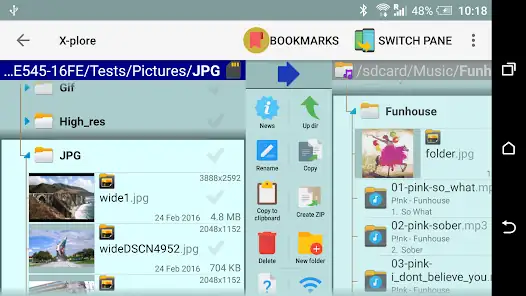
X-plore takes a different approach to dual-pane navigation. Instead of two flat file lists side by side, it shows a tree-style hierarchy in each panel. This means you can see the full structure of your storage internal, external, network without constantly jumping in and out of folders.
It also has real Android TV support with proper D-pad navigation, which is rare among file managers.
Key Strengths:
- Unique tree-view dual panels for deep folder navigation
- Genuine Android TV support with D-pad navigation
- Network support: FTP, SFTP, SMB, WebDAV
- Cloud: Dropbox, Google Drive, OneDrive, MEGA
- Root access included
- Free to use with an optional donation
Honest Limitations:
- The visual design is dated it does not follow Material Design guidelines
- No Wear OS or VR support
- No FTPS support
- No Device Connect or browser-based file transfer
- The nag screen on the free version gets annoying quickly
Who is it for? Users who prefer hierarchical tree-view navigation and want a free dual-pane file manager that also works properly on Android TV.
7. FX File Explorer — Best for Privacy-Conscious Users
Price: Free base app, FX Plus add-on ~$4.99 Developer: NextApp
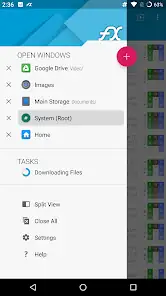
FX File Explorer has been on Android since the early days and built its reputation around one thing: privacy. The app contains no ads, no analytics, and no trackers a claim very few file managers can make honestly. FX also has a tab-based navigation system that power users tend to love, letting you switch between locations instantly without losing your place.
One genuinely clever feature is Web Access it lets you drag and drop entire folders from your PC directly to your phone over your local network, and even stream your music playlist to your computer.
Key Strengths:
- Zero ads, zero analytics, zero trackers genuinely privacy-first
- Tab-based navigation for fast multitasking
- Root access with detailed mount and permission controls (requires FX Plus)
- Network support: FTP, SFTP, SMB, WebDAV
- Cloud: Google Drive, Dropbox, OneDrive, Box
- Web Access feature for PC-to-phone drag and drop
- Text editor, shell script executor, and encryption support built in
Honest Limitations:
- Network and cloud features require the FX Plus purchase (~$4.99)
- No Wear OS or VR support
- Android TV version is not purpose-built it is the phone UI on a TV screen
- No browser-based device connect feature
Who is it for? Privacy-conscious users who want a capable, tracker-free file manager and appreciate tab-based multitasking. The FX Plus add-on is worth it if you need network access.
8. Amaze File Manager — Best Open-Source File Manager
Price: Free (cloud plugin available as optional purchase) Developer: Team Amaze Download: Google Play | F-Droid
Amaze File Manager is fully open-source under the GPLv3 license, with its code publicly available on GitHub. Team Amaze collects no user data whatsoever this is not a marketing claim, it is verifiable in the source code. For users who care deeply about transparency and privacy, that matters a lot.
It follows Material Design guidelines, runs smoothly, and covers all the basics without any bloat. Advanced features include root explorer access, AES file encryption and decryption, FTP/FTPS server hosting, and SMB/SFTP client support.
Key Strengths:
- Fully open-source (GPLv3) code is publicly auditable on GitHub
- No ads, no data collection, completely transparent
- AES encryption and decryption for file security
- Root explorer for advanced users
- FTP/FTPS server hosting and SMB/SFTP client support
- Multiple themes, navigation drawer, bookmarks, and history
- Available on both Google Play and F-Droid
- App manager for backup, opening, and uninstalling apps
Honest Limitations:
- Cloud storage requires a separate paid plugin.
- Rated 3.44 stars on Google Play not as polished as paid alternatives
- Image browsing has occasional bugs
- No dual-pane view
- Development moves more slowly than commercial apps
Who is it for? Open-source advocates, privacy-focused users, and anyone who wants a reliable, completely free file manager with nothing to hide literally.
Quick Comparison:
| Your Need | Best Pick |
|---|---|
| Best all-rounder (willing to pay) | Solid Explorer |
| Maximum customization and power | MiXplorer |
| Free and simple, no fuss | Files by Google |
| Free with storage analysis tools | Cx File Explorer |
| Windows TC workflow on Android | Total Commander |
| Tree-view navigation + Android TV | X-plore File Manager |
| Privacy-first, no trackers | FX File Explorer |
| Open-source, auditable code | Amaze File Manager |
Also Read: Best AI Resume Builders in 2026— Tested & Ranked
Also Read: 15 Best Free AI Tools for Students in 2026 (No Credit Card Needed)
Final Thoughts
There is no single best file manager app for Android, it depends entirely on what you actually need. Solid Explorer wins for most people because it balances power, design, and usability better than anything else at that price point. MiXplorer is the right answer if you want to go deep. And if free is the priority, Files by Google and Cx File Explorer both deliver solid experiences without costing a thing.
Pick the one that fits your workflow, not the one with the most features. The best file manager is the one you will actually use.