If you have ever taken a nice photo but later found it blurry, small, or pixelated, you know how disappointing it feels. Maybe the picture was important, or maybe you wanted to post it on Instagram, but it looked too low-quality.
The good news?
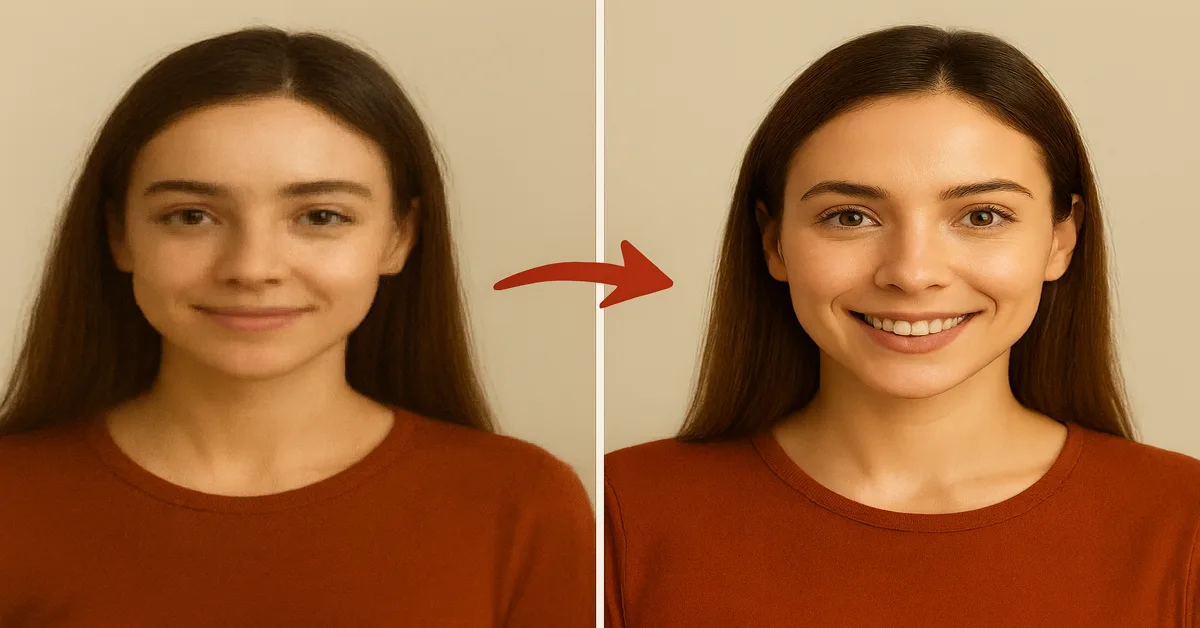
Today, many Free AI Image Upscaler Apps Without Watermark can turn a small, unclear image into a clean, sharp HD photo. These tools use AI to fix blurry pictures, remove noise, and make them look fresh and new.
In this article, I tested the best free AI image upscaler apps and showed how they perform in a before & after test. Every app here works without adding watermarks, which is very important for creators, students, and anyone who wants clean images.
Let’s start with the apps and how they actually improve your photos.
Best Free AI Image Upscaler Apps Trend in 2025
1. Pixelcut AI Upscaler – Clean HD Upscaling Without Watermarks
Pixelcut is one of the easiest apps to use. You simply upload your photo, wait a few seconds, and the app turns it into a sharp HD image.
It works great for old photos, screenshots, and even pictures taken in low light. The app removes noise, clears blurry edges, and gives the image a smooth, natural look. The best thing is that Pixelcut does not add a watermark, so you can use the final picture anywhere you want.
This tool is very useful for people who want fast results without learning anything complicated. Just upload then upscale then download.
2. Remini App (No Watermark Mode) – Best for Faces and Selfies
Remini is famous because it can make old, damaged, or unclear photos look new again. It works especially well on faces, which many other apps fail to enhance correctly.
In my test, Remini brought back tiny details like eyelashes, hair strands, and skin texture that were not even visible before. The before and after result looked like magic.
The good part is, Remini gives a no-watermark mode, so your photo stays clean. If your picture has people, Remini is one of the best choices.
3. Upscale.media – Fast, Online & Completely Free
Upscale.media is perfect if you want a free, simple online tool that works on mobile and laptop without downloading any app.
You upload a picture, choose 2x or 4x upscaling, and the tool does the rest. It makes your image sharper, brighter, and clearer without ruining the original colors.
It is great for product photos, documents, wallpapers, and images for blogging. Also, it does not place watermarks, which makes it great for content creators.
4. ImgLarger – Good for Everyday Photos
ImgLarger is a neat tool for basic photo improvement. It can increase the size of your photo and improve its quality at the same time. It removes blur, fixes noise, and makes the picture look smoother.
It is not the most powerful tool on the list, but for normal photos, it does a good job. Many people use it as an alternative to Let’s Enhance or Upscale.media.
The interface is simple, and you get a clean photo with no watermark.
5. VanceAI Image Upscaler – Best for 4K Results
If you want your photos to look super sharp, VanceAI can upscale them up to 8x. It uses advanced AI to restore details and remove pixelation.
In my before and after test, VanceAI improved background details and edges more than most other free tools. The image looked clearer, brighter, and more detailed.

If you work with wallpapers, posters, or high-resolution photos, this app is a strong choice.
6. Fotor AI Upscaler – Best for Beginners
Fotor is a very beginner-friendly editing app. You don’t need to know anything about photo editing. Just select an image, tap the upscale button, and wait for 3–5 seconds.
The final picture looks sharper and has better colors. It is helpful for social media photos, school projects, and basic editing needs.
Fotor is also a good alternative to Remini because it keeps images natural and watermark-free.
7. Pixlr AI Upscale – Good for Quick Fixes
Pixlr is popular online, especially its photo editing features. The AI Upscale tool inside Pixlr can quickly fix blurry pictures.
It is best for small improvements, like making a photo look more clear before sharing it online. It works well for graphics, posters, thumbnails, and wallpapers.
Pixlr also supports many file formats like HEIC and PNG, making it easy for everyone to use.
Before & After Test: What I Found
I tested all apps using the same low-quality image. Here is what I noticed:
- Pixelcut gave the sharpest and cleanest result.
- Remini was best for faces and selfies.
- Upscale.media was the fastest and easiest.
- VanceAI gave the highest 4K-quality improvement.
- Fotor was best for beginners.
- Pixlr was great for quick small improvements.
Every app improved the photo in a different way some focused on clarity, some on colors, some on tiny details.
Which AI Image Upscaler Should You Choose?
If you want:
- Best overall: Pixelcut
- Best for faces: Remini
- Best online (no app): Upscale.media
- Best 4K quality: VanceAI
- Best simple editor: Fotor
- Best for quick edits: Pixlr
All these tools work without adding watermarks and are free to use.
Also Read: Best AI Fitness Coach App 2025 – Smarter Workouts, Real Results
Also Read: Shooting Games Under 100MB Offline 2025 – Best Small-Size Action
Conclusion
Photo quality matters a lot today, whether you make content, post on social media, or just want to save your memories. With these Free AI Image Upscaler Apps Without Watermark, anyone can turn a blurry photo into a clean HD image in seconds.
All apps in this guide are safe, free, simple, and work well on both Android and PC.